Archivo de la categoría: Programación

Tema SpaceGray para PHPStorm

Suelo usar este tema en Sublime Text y la verdad es que me gusta mucho y me he acostumbrado a el, y lo echaba en falta cuando uso PHPStorm. Por fin he encontrado en GitHub el tema para usar en PHPStorm, ¡gracias abhimanyusharma003!

https://github.com/abhimanyusharma003/phpstorm-spacegray

Para instalarlo, lo mas sencillo es descargar el Master zip y seguir las indicaciones de instalación, que hay en la misma pagina dependiendo del sistema en el cual estemos usando PHPStorm.

 

PHP CURL POST & GET Examples – Submit Form using PHP CURL

Avatar de Sourabh JainSourabh Jain

In PHP CURL POST tutorial, I have explained how to send HTTP GET / POST requests with PHP CURL library.

Below are the examples covered in this article.
1) Send HTTP GET Request with CURL
2) Send HTTP POST Requests with CURL
3) Send Random User-Agent in the Requests
4) Handle redirects (HTTP 301,302)
5) Handle Errors.

Why we need PHP CURL ?
To send HTTP GET requests, simply we can use file_get_contents() method.

1
file_get_contens('http://hayageek.com')

But sending POST request and handling errors are not easy with file_get_contents().

Sending HTTP requests is very simple with PHP CURL.You need to follow the four steps to send request.

step 1). Initialize CURL session

1
$ch= curl_init();

step 2). Provide options for the CURL session

1
2
3
curl_setopt($ch,CURLOPT_URL,"http://hayageek.com");
curl_setopt($ch,CURLOPT_RETURNTRANSFER,true);
//curl_setopt($ch,CURLOPT_HEADER, true); //if you want headers

CURLOPT_URL ->…

Ver la entrada original 619 palabras más

Configurar visualización resultados Xdebug

A la hora de depurar en PHP una de las opciones que mas uso es el var_dump, el cual me da un volcado en pantalla de la variable que le pasamos. Esta función, usada sin Xdebug nos devuelve un volcado en texto plano el cual es un poco dificil de interpretar, aunque siempre podemos usarla en combinación con las etiquetas pre. Si tenemos activado el Xdebug, no hace falta ponerlo entre las etiquetas pre ya que la salida viene formateada.

Tomemos el siguiente ejemplo:


$variables = array(
 'uno' => array(
 'blanco' => array(
   'arriba' => array(
     'hola'
    ),
   'abajo' => array(
     'adios'
    )
   )
 )
);

var_dump($variables);

Si ejecutamos el var_dump sin tener Xdebug habilitado nos mostrara lo siguiente:

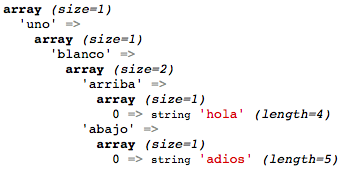
Captura de pantalla 2014-03-23 a la(s) 20.47.08Si lo ejecutamos con Xdebug habilitado

Captura de pantalla 2014-03-23 a la(s) 20.48.25Si veis, los valores de la tercera array anidada no se muestran, esto es debido a que los niveles de profundidad del Xdebug están establecidos como máximo a 3. Esto podemos modificarlo para que muestre los niveles de profundidad que nos interesen con estableciendo la variable xdebug.var_display_max_depth. En este ejemplo voy a establecer el nivel de profundidad a 4. El máximo valor que podemos establecer es 1023, y si no queremos poner limite la establecemos a -1. Para que esto funcione lo mas rápido es establecer su valor por medio del ini_set al principio del script.


ini_set('xdebug.var_display_max_depth', 4);

Ahora la visualización sera así

Captura de pantalla 2014-03-23 a la(s) 20.53.39

http://www.xdebug.com/docs/display

ScrollMagic – Plugin de jQuery de efectos para el scroll

Estoy deseando poder empezar un proyecto en el cual pueda encajar este plugin, el cual, nos permite realizar efectos de animación según avanzamos en nuestra pagina web. No os perdáis la pagina de demostración del plugin.

http://janpaepke.github.io/ScrollMagic/

Cambiar el tamaño de la fuente en las pestañas de Eclipse 4x

Si os habeis instalado alguna de las versiones 4 de Eclipse en Linux puede que una de las cosas que no se ven muy bien es el tamaño de la fuente con la cual pone el nombre de los ficheros en las pestañas, ya que esta aparece muy grande.

Si quereis modificar el tamaño de esa fuente para que sea mas pequeña podéis hacerlo editando el fichero css $eclipse/plugins/org.eclipse.platform_4.*/css/e4_default_gtk.css y buscar la sección .MPartStack y realizar el siguiente cambio:

.MPartStack {
/*      font-size: 11;*/
        swt-simple: false;
        swt-mru-visible: false;
}

Si ahora reiniciais eclipse veréis que el tamaño de fuente que aparece en las pestañas es mas normal.

http://marian.schedenig.name/2013/06/30/eclipse-4-x-tab-font-sizes-in-gtk/

http://stackoverflow.com/questions/11805784/very-large-tabs-in-eclipse-panes-on-ubuntu/11833695#11833695

Too many connections mysql

Avatar de VinodKumar SCWeb Collections

Some days before, after reached my office, i tried to access my web application, its show me a error message «Too many connections«, so I immediately logged in mysql server and checked the mysql service, it shows me «Running…» and then i connect mysql using 

«mysql -u root -p»

its connected successfully. And then i checked current processlist using the below command,

«Show processlist»

its shows me around 370 queries waiting in the queue which is more than max_connections. I had bad memory to remember everything, i just forget what maximum connection i set to this variable. To find this i edit the my.cnf file and it was 360. Actually this max_connections is a system variable and its default value is 151 which provides better performance. For my application, 151 is not enough, so we set to 360. But on that day we didn’t except this will…

Ver la entrada original 267 palabras más

Upgrade PHP 5.3 -> 5.5, should we?

Avatar de vietvoBlog Ông Việt

PHP 5.3.0 released on Jun 2009.

PHP 5.5, What’s New?

Latest -> Cool ٩(^ᴗ^)۶

Performance gain 10-30% (?)
Better garbage collection (reduce memory usage), up to 50%  (?) <?>

Reuse methods across classes with `Traits`

New SessionHander() class

Generator:

keyword `finally` in try{}catch(){}

Quick Get value (Bits and Bobs):

Support using:

Support list in foreach

Simplified password hashing

Class member access on object instantiation

———-

* Important! Check PHP Compatibility.

Ver la entrada original

Facebook unveils new programming language, Hack

Avatar de PaulRajeshRajesh Paul

It is called Hack but it has little to do with hacking. It is a new programming language designed by Facebook that lets programmers build complex websites and other software quickly and without many flaws.
«We can say with complete assurance that this has been as battle-tested as it can possibly be,» Bryan O’Sullivan, the Facebook engineer behind the language, said in a statement.
Experts say Hack is a new version of PHP — the language Facebook founder Mark Zuckerberg used when he started building Facebook.
Hack too runs on the Hip Hop Virtual Machine but it lets coders use both dynamic typing and static typing. For the next decade, Zuckerberg and his rapidly growing company continued to build their site with PHP.
But as a PHP site grows, you need far more computer servers to run the thing than you would with other languages and it can be…

Ver la entrada original 71 palabras más

Il valore creativo delle tecnologie obsolete

Avatar de coseimparateCosa ho imparato oggi?

Il passaggio da una tecnologia all’altra porta con sé un adattamento a diverse pratiche di pensiero e azione. Abbracciare un nuovo mezzo di espressione e creazione significa anche, implicitamente, abbandonare modalità di pensiero di cui spesso siamo scarsamente consapevoli. Su questa traccia si innestano alcune riflessioni di un recente articolo di William Gibson, autore noto per la fantascienza – su tutte, la sua opera più famosa è Neuromante (1984) – a cui si deve anche uno dei più interessanti contributi di “saggistica varia” degli ultimi anni, cioè Distrust That Particular Flavor (2012).

Spunto di riflessione è per Gibson l’iniziativa che risponde al nome di “The 78 Project”, che recupera il progetto di documentazione musicale “universale” che fu proprio del musicologo e antropologo americano Alan Lomax (1915-2002). Lomax è stato il primo grande etnomusicologo del mondo occidentale. Le sue registrazioni audio, in seguito confluite nell’Archive of American Folk…

Ver la entrada original 299 palabras más

Marketing 3.0: la nueva tendencia