10 reasons why WordPress is a better starting point for a project than you thought, even though you’re an advanced PHP developer

I didn’t quite mean to make this a «top 10» list, but it did work out to 10 items, and it’s indeed a list.
UPDATE: I didn’t make a few points clear originally, so let me add some context here.
The impetus for writing this post was of 3 weekend projects that never got off the ground because I got bogged down with the setup. I was familiar with the framework I was using, it gave me all the tools I needed to get the project going, and as I started building my functionality I started realizing I needed X, Y and Z to keep going. So I grabbed packages (some I was familiar with, others less so, but all were modular and would fit right in with the framework I was using) and spent a bunch more time getting them connected and playing nice with each other, realizing I…
Ver la entrada original 677 palabras más
PHP Lesson : Data Types, Constant Value, and Casting Variable

Hello everyone 😀
Chapter 3 Part 1,
Our material for this post are data types, constant value, and how to casting a variable.
Since we know that PHP variable is very flexible and can become any data types, we still need to know which data types it will be.
Constant value, sometimes we need to define a constant value like Phi = 3.1415926535, it will be useful using a constant value than a normal variable. Casting variable, even though I’d write that variable in PHP will be indicates as String, sometimes we will need to cast it into other data types.
Anyway, let’s begin our material 😀
Ver la entrada original 522 palabras más
Send Email using gmail’s SMPT server with PHP(part 01)
The key differences between MySQL and NoSQL DBs.

Not long ago, data was stored in physical files that were archived into racks of folders filling up entire rooms in the offices of large corporations. Then came computers, and the go to technique for storage changed to flat file databases. But times have changed again now, and things are more complicated than ever before.
Today, SQL databases have become an integral part of the IT infrastructure of any organization. For example, MySQL, an RDBMS based SQL implementation for the web, now powers very large-scale websites like Google, Facebook, Twitter and even YouTube. With this said, MySQL is the world’s most popular database and remains so because of its open source nature.
Technology changes rapidly and now the new buzzword in the database arena is NoSQL. What is NoSQL, you might wonder? It is a database technology different from MySQL, primarily because it doesn’t involve the Structured Query Language.
Ver la entrada original 482 palabras más
The key differences between MySQL and NoSQL DBs.
Not long ago, data was stored in physical files that were archived into racks of folders filling up entire rooms in the offices of large corporations. Then came computers, and the go to technique for storage changed to flat file databases. But times have changed again now, and things are more complicated than ever before.
Today, SQL databases have become an integral part of the IT infrastructure of any organization. For example, MySQL, an RDBMS based SQL implementation for the web, now powers very large-scale websites like Google, Facebook, Twitter and even YouTube. With this said, MySQL is the world’s most popular database and remains so because of its open source nature.
Technology changes rapidly and now the new buzzword in the database arena is NoSQL. What is NoSQL, you might wonder? It is a database technology different from MySQL, primarily because it doesn’t involve the Structured Query Language.
Ver la entrada original 482 palabras más
5 tutoriales para hacer webs responsives.

Aprende a usar MongoDB
¿Que es MongoDB?
Si buscamos en la wikipedia nos dice:
MongoDB (de la palabra en inglés “humongous” que significa enorme) es un sistema de base de datos NoSQL orientado a documentos, desarrollado bajo el concepto de código abierto.
MongoDB forma parte de la nueva familia de sistemas de base de datos NoSQL. En vez de guardar los datos en tablas como se hace en las base de datos relacionales, MongoDB guarda estructuras de datos en documentos tipo JSON con un esquema dinámico (MongoDB llama ese formato BSON), haciendo que la integración de los datos en ciertas aplicaciones sea más fácil y rápida.
Es decir es un sistema de base de datos en el cual no se usa SQL para acceder a el y guarda los datos en documentos.
Si quereis podeis aprender a usarlo aquí http://try.mongodb.org
Mas información: http://www.mongodb.org http://es.wikipedia.org/wiki/MongoDB

Opciones de PHP desde Linea de comandos – PHP Tips
Hoy voy a explicar alguna de las opciones que tiene PHP desde la linea de comandos. Una de las opciones mas útiles es la de poder probar nuestro código vía web sin necesidad de tener instalado un servidor web, esta es una opción que solo esta disponible a partir de la versión 5.4
Servidor web integrado
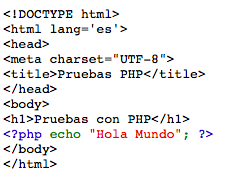
Supongamos que tenemos el siguiente código guardado en un fichero llamado index.php
<!DOCTYPE html>
<html lang='es'>
<head>
<meta charset="UTF-8">
<title>Pruebas PHP</title>
</head>
<body>
<h1>Pruebas con PHP</h1>
<?php echo "Hola Mundo"; ?>
</body>
</html>
Si desde la terminal lanzamos el siguiente comando:
php -S localhost:8888 index.php
Abrimos un navegador y tecleamos la siguiente dirección localhost:8888

Para terminar la ejecución del servidor pulsamos CTRL + c en el terminal que hemos lanzado el comando y se terminara.
Sintaxis coloreada
Con el mismo código que hemos usado antes tecleamos lo siguiente, imaginemos que queremos crear una versión HTML para ver el código que tenemos. Ejecutamos lo siguiente
php -s index.php > index.html
Esto nos generara el archivo index.html, y si lo abrimos veremos el código fuente coloreado
Comprobar sintaxis
También podemos comprobar la sintaxis desde la linea de comandos de la siguiente manera
php -l index.php
Si tenemos algún error en nuestra sintaxis este comando nos mostrara donde.
 rubenlacasa.es